NoventisManualML
While AutoML provides a powerful, hands-off approach, expert users often require granular control over model selection, hyperparameter tuning, and in-depth analysis. The NoventisManualML is designed precisely for this purpose. It serves as a comprehensive toolkit for building, tuning, comparing, and explaining a user-defined set of machine learning models.
Leveraging advanced libraries like Optuna for hyperparameter optimization and SHAP for explainability, it provides a structured and powerful environment for deliberate and insightful machine learning experimentation. It is the ideal tool when you want to compare specific algorithms or dive deep into the behavior of a single, highly-tuned model.
from noventis.predictor import NoventisManualMLKey Features
Custom Model Suite
Train and compare one or more specific models from a comprehensive list, including
LogisticRegression, RandomForest, XGBoost, LightGBM, and more.Advanced Hyperparameter Tuning
Integrates Optuna to perform sophisticated, state-of-the-art hyperparameter optimization, helping you squeeze maximum performance out of each model.
Deep Model Explainability
Incorporates SHAP to provide deep, model-agnostic insights into how your model makes predictions, generating summary, beeswarm, and dependence plots.
Flexible Preprocessing
Includes a robust internal preprocessor for handling missing values and categorical features, and can optionally be chained with a pre-configured
NoventisDataCleanerinstance for more complex cleaning pipelines.Comprehensive Reporting
Generates a detailed, interactive HTML report that consolidates performance metrics, model comparisons, evaluation plots, and feature importance into a single, easy-to-navigate dashboard.
Parameters
| Parameter | Type | Default | Description |
|---|---|---|---|
| model_name | Union[str, List[str]] | None | The core parameter defining the experiment. Provide a single model name as a string (e.g., 'xgboost') or a list of names to train and compare (e.g., ['random_forest', 'lightgbm']). |
| task | str | None | The machine learning task. Must be either 'classification' or 'regression'. |
| tune_hyperparameters | bool | False | If True, enables hyperparameter optimization for each model using Optuna. If False, models are trained with their default parameters. |
| n_trials | int | 50 | The number of optimization trials to run per model when tune_hyperparameters is True. |
| data_cleaner | Optional[NoventisDataCleaner] | None | An optional, pre-configured NoventisDataCleaner instance. If provided, its cleaning pipeline will be applied to the data before training. |
| cv_folds | int | 3 | The number of cross-validation folds to use during the hyperparameter tuning process. |
| cv_strategy | str | 'repeated' | The cross-validation strategy for tuning classification models. Can be 'repeated' (uses RepeatedStratifiedKFold) or another value (uses StratifiedKFold). |
| show_tuning_plots | bool | False | If True and tune_hyperparameters is enabled, displays Optuna's optimization history and parameter importance plots during the run. |
| output_dir | Optional[str] | None | A directory path where all artifacts (saved models, plots, reports) will be stored. If provided, a unique sub-folder is created for each run. |
None'xgboost') or a list of names to train and compare (e.g., ['random_forest', 'lightgbm']).None'classification' or 'regression'.False50tune_hyperparameters is True.NoneNoventisDataCleaner instance. If provided, its cleaning pipeline will be applied to the data before training.3'repeated''repeated' (uses RepeatedStratifiedKFold) or another value (uses StratifiedKFold).Falsetune_hyperparameters is enabled, displays Optuna's optimization history and parameter importance plots during the run.NoneMain Workflow Method
.fit(df, target_column, test_size=0.2, compare=False, explain=False, display_report=True)
This is the primary method to execute the entire workflow. It orchestrates data splitting, preprocessing, model training (and optional tuning), evaluation, and reporting. It's the main entry point for using the
ManualPredictor.- df (
pd.DataFrame): The full dataset including the target column. - target_column (
str): The name of the column to be predicted. - test_size (
float): The proportion of data to hold out for testing. - compare (
bool): If True, prints a summary table comparing all trained models. - explain (
bool): If True, generates a bar plot comparing model performance. - display_report (
bool): If True, automatically displays the final HTML report in the output cell (in Jupyter environments).
- df (
Reporting & Analysis Methods
.generate_html_report(filepath=None) → str
Creates the comprehensive HTML report, which includes an execution summary, a detailed model comparison table, and all generated visualizations. The report can be saved to a file if a
filepathis provided..display_report()
A convenience method to display the generated HTML report directly in a Jupyter or Google Colab output cell.
.explain_model(plot_type='summary', feature=None)
Provides deep model explainability for the best-performing model using SHAP. It can generate different visualizations to understand feature impacts on the model's predictions.
- plot_type:
'summary'(default),'beeswarm', or'dependence'. - feature: The name of a feature is required for the
'dependence'plot.
- plot_type:
.get_results_dataframe() → pd.DataFrame
Returns a clean pandas DataFrame containing the performance metrics for all successfully trained models, sorted by the primary evaluation metric.
Utility Methods
.save_model(filepath=None)
Saves the best-performing model from the pipeline run to a
.pklfile for later use. Iffilepathis not provided, it saves to theoutput_dir..load_model(filepath) → object
A utility function to load a saved
.pklmodel from the specified path..predict(X_new, model_path=None)
Makes predictions on new data using either the best model from the session or a loaded model from a file.
Model Usage Examples
Prepare Dataset
Classification
import pandas as pd
import seaborn as sns
import pandas as pd
from sklearn.datasets import fetch_california_housing
from noventis.predictor import NoventisAutoML

df_titanic = sns.load_dataset('titanic')

df_titanic_clean = df_titanic.drop(columns=['deck', 'embark_town', 'alive'])
df_titanic_clean = df_titanic_clean.dropna()
Regression
import pandas as pd
import seaborn as sns
import pandas as pd
from sklearn.datasets import fetch_california_housing
from noventis.predictor import NoventisAutoML

housing = fetch_california_housing()

df_housing = pd.DataFrame(housing.data, columns=housing.feature_names)
df_housing['MedHouseVal'] = housing.targetExample 1: The Full Experience (Default)
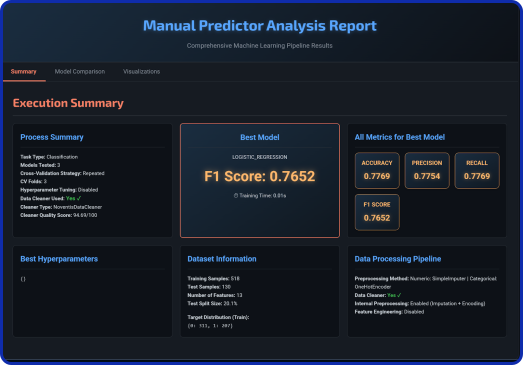
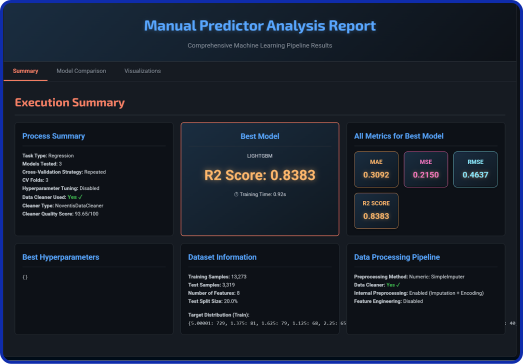
Demonstrates how to train and compare a specified list of models using their default parameters, leveraging the integrated data cleaner for preprocessing.
Classification
manualml = NoventisManualML(
    model_name=['logistic_regression',
                'random_forest', 'lightgbm'],
    task='classification',
)
results = manualml.fit(
    df=df_titanic_clean,
    target_column='survived',
    use_data_cleaner=True
)
Regression
manualml = NoventisManualML(
    model_name=['linear_regression',
                'random_forest', 'lightgbm'],
    task='regression',
)
results = manualml.fit(
    df=df_housing,
    target_column='MedHouseVal',
    use_data_cleaner=True
)
Example 2: ManualML With Hyperparameter tunning
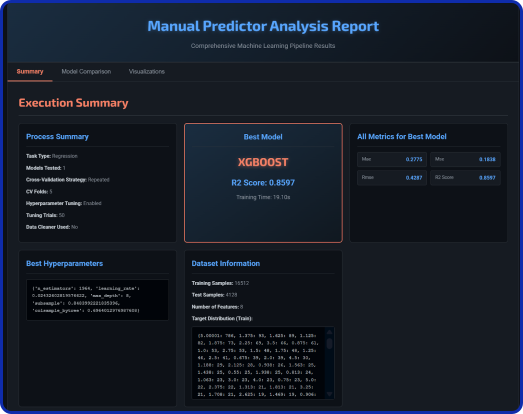
Showcases how to enable Optuna-based hyperparameter tuning for a single model to find its optimal configuration, along with displaying tuning plots.
Classification
manualml_tunning =NoventisManualML(
    model_name='xgboost',
    task='classification',
    tune_hyperparameters=True,
    n_trials=50,
    cv_folds=5,
    show_tuning_plots=True,
    random_state=42
)
results = manualml_tunning.fit(
    df=df_titanic_clean,
    target_column='survived',
    display_report=True,
    compare=True,
    explain=True,
    use_data_cleaner=True
)
Regression
manualml = NoventisManualML(
    model_name='xgboost',
    task='regression',
    tune_hyperparameters=True,
    n_trials=50,
    cv_folds=5,
    show_tuning_plots=True,
    random_state=42
)
results = manualml.fit(
    df=df_housing,
    target_column='MedHouseVal',
    display_report=True,
    compare=True,
    explain=True,
    use_data_cleaner=True
)
Example 3: Save and use your model
This demonstrates the practical workflow of saving the best model found during the pipeline run and then loading it back for future use, simulating deployment.
manualml .save_model(filepath='best_xgboost_model.pkl')
loaded_model = NoventisManualML.load_model(filepath='best_xgboost_model.pkl')
print(f"Model {type(loaded_model)} successfully loaded.")