NoventisAutoEDA
Exploratory Data Analysis (EDA) is the crucial first step in any data science project, essential for understanding the structure, patterns, and quality of a dataset. However, performing a thorough EDA manually can be a time-consuming and repetitive task.
NoventisAutoEDA is a powerful tool designed to automate this entire process. With just a few lines of code, it generates a comprehensive, interactive HTML dashboard that provides deep insights into your dataset. Its most unique feature is its "personality" system, which tailors the analysis and visualizations to specific user needs, whether you're a business analyst looking for actionable KPIs, a researcher needing rigorous statistical validation, or a data scientist wanting a complete overview.
from noventis.eda_auto import NoventisAutoEDAKey Features
One-Click EDA
Generates a full EDA report with a single command, saving hours of manual work.
Interactive HTML Dashboard
All insights are presented in a user-friendly, tabbed HTML report that is easy to navigate and share.
Persona-Driven Insights
The analysis is tailored to your needs through different "personalities" (
'default', 'business', 'academic').Target-Aware Analysis
If a target variable is specified, the report includes additional analyses showing relationships between features and the target.
Comprehensive Analysis
Covers all essential EDA aspects, including descriptive statistics, missing value analysis, outlier detection, distribution plotting, and correlation analysis.
Parameters
| Parameter | Type | Default | Description |
|---|---|---|---|
| data | Union[pd.DataFrame, str] | None | The input data. This can be an existing pandas DataFrame or a string containing the file path to a CSV file. |
| target | str | None | An optional string specifying the name of the target column. Providing a target enables deeper, bivariate analysis within the report. |
| personality | str | 'default' | Determines the focus and content of the report, tailoring it to a specific audience. • 'default': Generates a standard, comprehensive EDA report covering all fundamental aspects of the data. This is ideal for general-purpose data science exploration.• 'business': Generates a high-level dashboard focused on actionable business insights. It includes panels for Data Quality ROI, Customer Intelligence (segmentation), and a Feature Priority Matrix to guide strategic decisions.• 'academic': Generates a deep-dive dashboard for rigorous statistical validation. It includes panels for Normality Tests (Shapiro-Wilk), Multicollinearity Analysis (VIF), and baseline Model Diagnostics.• 'all': Generates a report containing both the 'business' and 'academic' dashboards in separate tabs. |
NoneNone'default'Determines the focus and content of the report, tailoring it to a specific audience.
'default': Generates a standard, comprehensive EDA report covering all fundamental aspects of the data. This is ideal for general-purpose data science exploration.'business': Generates a high-level dashboard focused on actionable business insights. It includes panels for Data Quality ROI, Customer Intelligence (segmentation), and a Feature Priority Matrix to guide strategic decisions.'academic': Generates a deep-dive dashboard for rigorous statistical validation. It includes panels for Normality Tests (Shapiro-Wilk), Multicollinearity Analysis (VIF), and baseline Model Diagnostics.'all': Generates a report containing both the 'business' and 'academic' dashboards in separate tabs.Main Workflow Method
.run(show_base_viz=True) → HTML
This is the primary method that triggers the analysis and generates the final interactive HTML report.
show_base_viz (bool):If True (default), the report will include all the standard, detailed EDA tabs (Overview, Missing Values, Correlation, etc.). If set toFalse, the report will only contain the specialized 'personality' dashboards, which is useful for creating focused, high-level reports for specific audiences.
The HTML Report
The output is a detailed HTML dashboard with several interactive tabs.
Standard Analysis Tabs (when
show_base_viz=True)- Overview: Basic information like dataset shape, column types, and a data preview.
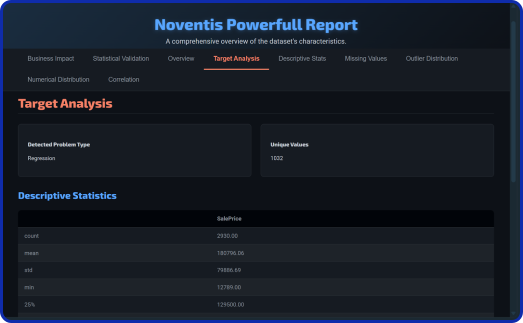
- Target Analysis: Detailed breakdown of the target variable’s distribution.
- Descriptive Stats: A comprehensive table of statistical summaries for all columns.
- Missing Values: Analysis of missing data with counts, percentages, and a heatmap.
- Outlier Distribution: Boxplots and summaries for outliers in numeric columns.
- Numerical Distribution: Histograms and skewness analysis for all numeric columns.
- Correlation: A correlation matrix (heatmap or table) and lists of highly correlated pairs.
Business Intelligence Dashboard (when
personality='business')- Data Quality ROI: A KPI dashboard showing the impact of missing data, outliers, and duplicates on overall data quality.
- Customer Intelligence: An analysis of the most impactful categorical feature to identify key customer segments or product categories.
- Priority Matrix: A quadrant analysis that maps feature impact against data quality to help prioritize data cleaning efforts.
Academic Statistical Dashboard (when
personality='academic')- Distribution Test: Applies the Shapiro–Wilk test to key numeric variables to formally test for normality.
- Correlation Validation: Provides a deep dive into multicollinearity by calculating the Variance Inflation Factor (VIF) for all numeric features.
- Model Diagnostics: Fits a simple baseline model to provide initial insights into feature importance and residual patterns.
Usage Examples
Prepare Dataset
import pandas as pd
from noventis.eda_auto import NoventisAutoEDA

#Assume ‘AmesHousing.csv’ is in your folder
df = pd.read_csv('AmesHousing.csv')Example 1: Standard Comprehensive EDA
Generate a full EDA report with all standard analytical tabs for a given target variable.
analyzer_default = NoventisAutoEDA(data=df,
target='SalePrice')

analyzer_default.run()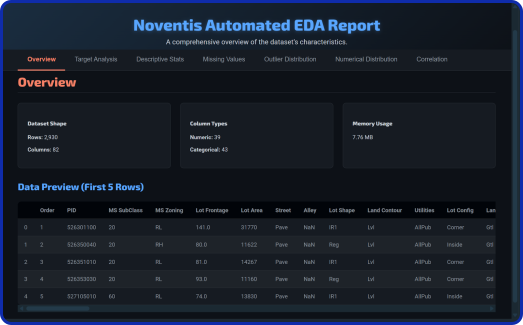
Example 2: Focused Business Intelligence Dashboard
Generate a high-level report tailored for business stakeholders, showing only the business-focused dashboard.
analyzer_business = NoventisAutoEDA(data=df,
target='SalePrice', personality='business')

analyzer_business.run(show_base_viz=False)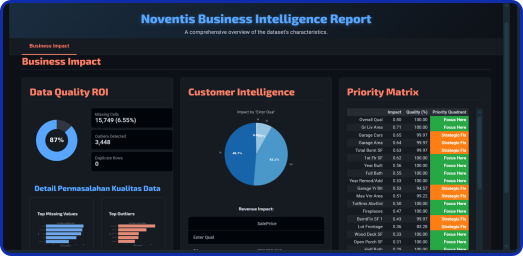
Example 3: Rigorous Academic Statistical Reportn
Generate a deep-dive statistical report to validate data assumptions.
analyzer_academic = NoventisAutoEDA(df,
target='SalePrice', personality='academic')

analyzer_academic.run()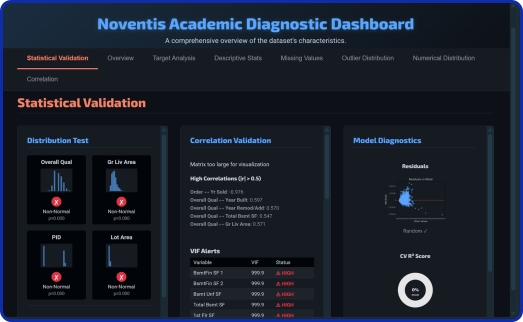
Example 4: All-in-One Report
Generate a single report that includes the Business dashboard, the Academic dashboard, and all the standard EDA tabs.
analyzer_full = NoventisAutoEDA(data=df,
target='SalePrice', personality='all')

analyzer_full.run()