NoventisAutoML
The journey from a prepared dataset to a high-performing, deployable machine learning model involves numerous steps: model selection, hyperparameter tuning, rigorous evaluation, and comparison. NoventisAutoML is an all-in-one solution designed to automate this entire workflow. It acts as your personal automated data scientist, exploring various models, optimizing their performance within a set budget, and delivering a comprehensive, interactive report with actionable insights. for normal data, RobustScaler for data with outliers, or PowerTransformer for skewed data—is often a tedious manual process.
Powered by the robust FLAML library, it can find the best model through an efficient AutoML search, train a specific list of models you define, or do both and compare them head-to-head to find the undisputed champion for your dataset.
from noventis.predictor import NoventisAutoMLKey Features
Hybrid Modeling Approach
Seamlessly run a state-of-the-art AutoML search, train a specific list of manual models (like
xgboost, random_forest,etc.), or do both simultaneously and compare them to find the absolute best performer.Fully Automated Workflow
Handles data loading (from CSV or DataFrame), automatic task detection (classification/regression), and stratified train-test splitting.
Rich Explainability & Visualization
When
explain=True, automatically generates a suite of insightful plots including feature importance, confusion matrices, ROC/AUC & Precision-Recall curves, residual plots, and more. .Interactive HTML Reporting
Produces a stunning, self-contained HTML dashboard that consolidates all results, performance metrics, model comparisons, and plots into a single, user-friendly, and shareable file.
Rich Explainability & Visualization
Automatically saves the best-performing model as a .pkl file, ready for easy loading and deployment for future predictions.
Parameters
| Parameter | Type | Default | Description |
|---|---|---|---|
| data | Union[str, pd.DataFrame] | None | The input data. This can be either a pandas DataFrame or a string containing the file path to a CSV file. |
| target | str | None | The name of the target variable (the column you want to predict). |
| task | Optional[str] | None | The type of machine learning task. Can be 'classification' or 'regression'. If None, the task will be automatically inferred from the target column's data type and distribution. |
| models | List[str] | None | A list of model names to train manually and compare. If • Classification examples: 'logistic_regression', 'random_forest', 'xgboost', 'lightgbm'.• Regression examples: 'linear_regression', 'random_forest', 'xgboost'. |
| explain | bool | True | generates all performance visualizations and saves them to the output_dir. |
| compare | bool | True | Controls the operating mode. • If True (default), the tool will run the AutoML engine and train the models specified in models, then compare all of them to find the best one.• If False, it will only run one of the two modes: either AutoML (if models is None) or the manual list of models (if models is provided). |
| metrics | str | None | The primary metric to use for optimization and model ranking. If • Classification examples: 'accuracy', 'precision', 'recall', 'f1_score'.• Regression examples: 'r2_score', 'mae', 'mse'. |
| time_budget | int | 60 | The total time in seconds allocated to the AutoML engine for its search process. A larger budget allows for a more thorough search. |
| output_dir | str | 'Noventis_Results' | The directory where all outputs (saved models, plots, reports) will be stored. |
| test_size | float | 0.2 | The proportion of the dataset to allocate to the test set. |
| random_state | int | 42 | The random seed for ensuring reproducibility in data splitting and model training. |
NoneNoneNone'classification' or 'regression'. If None, the task will be automatically inferred from the target column's data type and distribution.NoneA list of model names to train manually and compare. If None and compare=True, a default list of common models will be used. This parameter is ignored if compare=False and you are only running the AutoML engine.
'logistic_regression', 'random_forest', 'xgboost', 'lightgbm'.'linear_regression', 'random_forest', 'xgboost'.Trueoutput_dir.TrueControls the operating mode.
True (default), the tool will run the AutoML engine and train the models specified in models, then compare all of them to find the best one.False, it will only run one of the two modes: either AutoML (if models is None) or the manual list of models (if models is provided).NoneThe primary metric to use for optimization and model ranking. If None, it defaults to 'macro_f1' for classification and 'r2' for regression.
'accuracy', 'precision', 'recall', 'f1_score'.'r2_score', 'mae', 'mse'.60'Noventis_Results'0.242Main Workflow Method
.fit(time_budget=60, metric=None) → dict
This is the primary method to execute the entire AutoML pipeline. It orchestrates data splitting, model training (AutoML and/or manual), evaluation, comparison, and saving the best model. It returns a dictionary containing all detailed results from the run. The
time_budgetandmetricparameters can be used here to override the values set during initialization.
Reporting & Analysis Methods
.generate_html_report() → HTML
Generates the comprehensive, interactive HTML report of the entire process. In Jupyter environments, this report is often displayed automatically after
.fit()completes..get_model_info() → dict
Returns a dictionary with details about the best-found model, including the final estimator, its configuration, and feature names.
.export_results_to_csv()
Saves key results—including predictions on the test set, performance metrics, and feature importances—to CSV files in the output_dir for external analysis.
Utility Methods
.predict(X_new, model_path=None)
Makes predictions on new, unseen data (X_new). It can either use the model trained in the current session or load a previously saved model from a file specified by
model_path..load_model(model_path) → object
A utility function to load a saved
.pklmodel from the specified path.
Model Usage Examples
Prepare Dataset
Classification
import pandas as pd
import seaborn as sns
import pandas as pd
from sklearn.datasets import fetch_california_housing
from noventis.predictor import NoventisAutoML

df_titanic = sns.load_dataset('titanic')

df_titanic_clean = df_titanic.drop(columns=['deck', 'embark_town', 'alive'])
df_titanic_clean = df_titanic_clean.dropna()
Regression
import pandas as pd
import seaborn as sns
import pandas as pd
from sklearn.datasets import fetch_california_housing
from noventis.predictor import NoventisAutoML

housing = fetch_california_housing()

df_housing = pd.DataFrame(housing.data, columns=housing.feature_names)
df_housing['MedHouseVal'] = housing.targetExample 1: The Full Experience (Default)
Run AutoML, compare it against a default list of common models, and generate a full report.
Classification
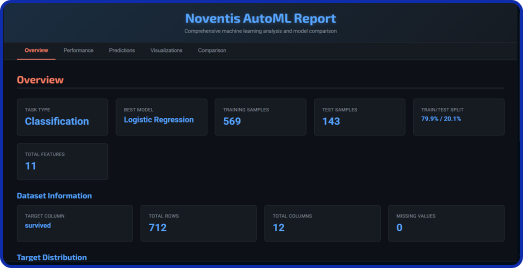
automl = NoventisAutoML(data=df_titanic_clean, target='survived', task='classification', time_budget=30)
results = automl.fit()
automl.generate_html_report()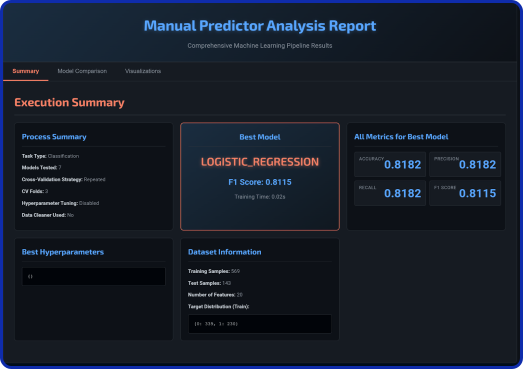
Regression
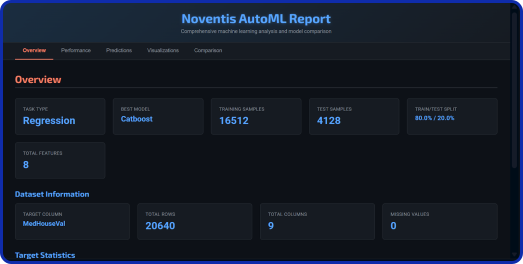
automl = NoventisAutoML(data=df_housing, target='MedHouseVal', task='regression', time_budget=30)
results = automl.fit()
automl.generate_html_report()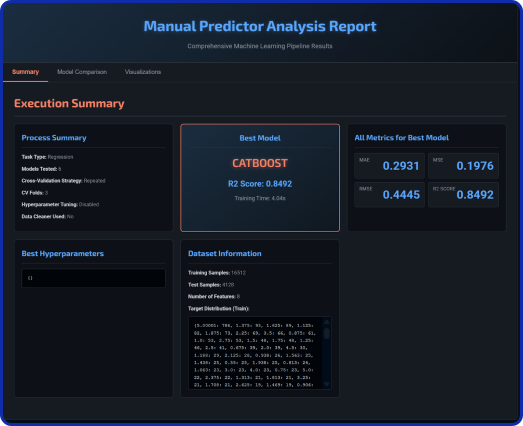
Pure AutoML Search
Focus exclusively on finding the best possible model using the AutoML engine within a 5-minute budget.
Classification
automl_pure = NoventisAutoML(
    data=df_titanic_clean,
    target='survived',
    compare=False,
    models=None,
    task='classification',
    time_budget=30,
    metrics='accuracy'
)
results = automl_pure.fit()
automl_pure.generate_html_report()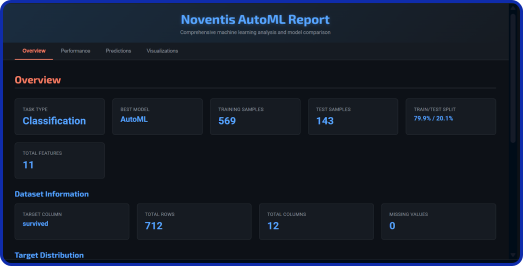
Regression
automl = NoventisAutoML(
    data=df_housing,
    target='MedHouseVal',
    compare=False,
    models=None,
    task='regression',
    time_budget=30,
    metrics='mae'
)
results = automl.fit()
automl.generate_html_report()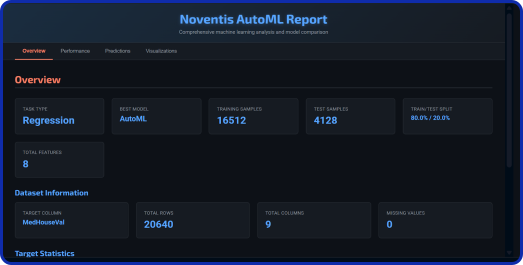
Manual Model Training & Comparison
Train only a specific set of models you want to evaluate, without running the AutoML search.
Classification
automl_pure = NoventisAutoML(
    data=df_titanic_clean,
    target='survived',
    compare=False,
    models=['random_forest', 'lightgbm',
            'logistic_regression'],
    task='classification'
)
results = automl_pure.fit()
automl_pure.generate_html_report()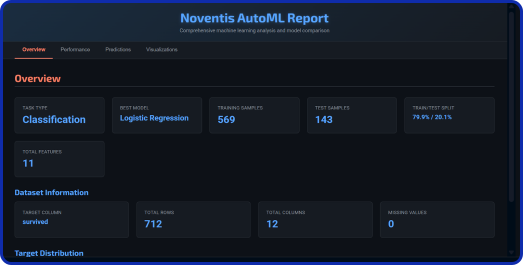
Regression
automl = NoventisAutoML(
    data=df_housing,
    target='MedHouseVal',
    compare=False,
    models=['linear_regression', 'random_forest',
            'xgboost'],
    task='regression'
)
results = automl.fit()
automl.generate_html_report()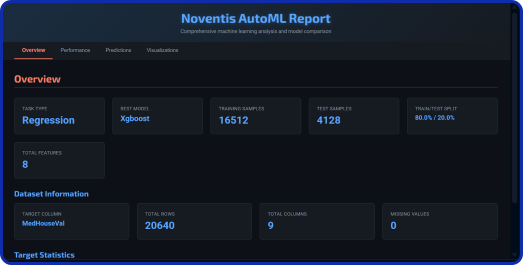
Loading a Saved Model and Predicting
Train a model, then load the saved best model and use it to predict on new data.
from noventis.predictor import NoventisAutoML
import pandas as pd

# First, run the training process
automl = NoventisAutoML(data='path/to/train_data.csv', target='YourTargetColumn')
automl.fit()

# Now, load new data for prediction
new_data = pd.read_csv('path/to/new_unseen_data.csv')

# Use the predict method (it automatically finds the best saved model)
predictions = automl.predict(X_new=new_data, model_path='Noventis_Results/best_model.pkl')

print(predictions)